Learn what an ATS is, how it works, and how to build a resume that gets past it and into recruiters' hands.
Applying for jobs has never been easier, but getting your resume noticed has become more challenging. Before a recruiter reviews your application, there's a good chance it passes through an Applicant Tracking System (ATS).
Many job seekers believe an ATS automatically rejects resumes or that only "perfectly optimized" resumes make it through. In reality, an ATS is a tool designed to help recruiters manage large volumes of applications, organize candidate information, and identify resumes that closely match a job's requirements.
Understanding how an ATS works can significantly improve your chances of landing interviews. More importantly, it helps you create a resume that is easy for both software and hiring managers to read.
In this guide, you'll learn what an Applicant Tracking System is, how it works, what recruiters actually see, common myths about ATS software, and practical ways to make your resume more ATS-friendly.
Why understanding ATS matters
The average job opening can receive dozens or even hundreds of applications. Reviewing every resume manually would be time-consuming for recruiters, especially in large organizations.
That's where Applicant Tracking Systems come in. Instead of replacing recruiters, ATS software helps them organize applications, search candidate profiles, and quickly identify people who meet the basic qualifications.
For job seekers, understanding ATS matters because it helps you:
• Create resumes that are easy to read and parse
• Match your experience to job requirements more effectively
• Avoid formatting mistakes that can hide important information
• Increase the likelihood that recruiters find your resume during searches
An ATS isn't something to fear. It's simply another part of today's hiring process, and knowing how it works gives you an advantage.
By the numbers
• Nearly all Fortune 500 companies, around 98–99% run their hiring through an ATS.
• Roughly three out of four recruiters rely on an ATS or similar tech-driven tool to review applicants.
• The large majority of recruiters say their ATS has had a positive impact on how their organization hires.
Source: industry research citing SHRM and LinkedIn data, compiled by SelectSoftwareReviews (2026).
What is an applicant tracking system (ATS)?
An Applicant Tracking System (ATS) is recruitment software that helps employers collect, organize, search, and manage job applications throughout the hiring process.
When you submit a resume online, the ATS stores your information in a searchable database. It also extracts details such as your work history, education, skills, certifications, and contact information so recruiters can quickly compare candidates.
Think of an ATS as a digital filing cabinet combined with a searchable database. Instead of reviewing stacks of paper resumes, recruiters can:
• Search for candidates with specific skills
• Filter applicants by experience or education
• Track candidates throughout the hiring process
• Schedule interviews
• Manage communication with applicants
The ATS supports hiring teams by making recruitment more organized and efficient—not by making hiring decisions independently.
ATS vs. HR Software
Although the terms are sometimes used interchangeably, they serve different purposes.
Applicant Tracking System: manages recruiting and hiring, stores resumes, tracks applications, supports recruiters.
HR Software: manages employees after they're hired, stores employee records, tracks payroll/benefits/performance, supports HR operations.
Many modern HR platforms include an ATS as one of their features, but their primary functions remain different.
How an applicant tracking system works
To understand how ATS software affects your application, it helps to follow the process from submission to recruiter review: Submit → Parse → Store → Search → Review.

Step 1: You submit your Resume
After clicking "Apply," your resume enters the employer's ATS. Depending on the company, you may upload a PDF or Word document, complete an online application, or both. The system stores your files and prepares them for processing.
Step 2: The ATS parses your resume
Resume parsing is the process of extracting information from your document. The ATS identifies sections such as name, phone number, email address, professional summary, work experience, education, skills, certifications, and dates of employment, then organizes this information into structured fields inside the database.
This is why clear headings and simple formatting are important. If the ATS struggles to identify your information, recruiters may receive incomplete candidate profiles.
Step 3: Your resume is added to a candidate database
Once parsed, your resume becomes part of the employer's searchable database. Recruiters can later search this database using keywords such as Project Management, Python, Salesforce, Digital Marketing, CPA, or Registered Nurse. Even if your application isn't selected immediately, recruiters may discover your resume later when another position opens.
Step 4: Recruiters search and filter candidates
This is one of the most misunderstood parts of ATS software. Recruiters often search using combinations of required skills, certifications, years of experience, job titles, education, and location. Candidates whose resumes clearly demonstrate these qualifications are easier to find.
Step 5: Recruiters review qualified resumes
Once recruiters identify promising candidates, they manually read the resumes. This is an important point: people—not software—make hiring decisions. The ATS helps organize applications, but recruiters still evaluate relevant accomplishments, career progression, communication skills, industry experience, cultural fit, and overall resume quality.
A well-written resume needs to satisfy both the ATS and the human reader.
What information does an ATS read from your resume?
Modern Applicant Tracking Systems can recognize far more than just keywords. They typically extract information from several sections of your resume, then organize it into a structured candidate record—name and contact info, work experience, skills, and education/certifications, that's fully searchable by any recruiter using matching keywords.
Contact information
Most ATS platforms identify your full name, email address, phone number, city and state (or country), and LinkedIn profile if included. Keeping this section simple helps ensure nothing is missed.
Work experience
The ATS usually captures employer names, job titles, employment dates, responsibilities, and achievements. Using clear job titles and measurable accomplishments improves both ATS parsing and recruiter understanding.
Education
Most systems identify degree, institution, graduation year, and relevant coursework (optional).
Skills
Skills are among the most searchable parts of your resume—examples include SQL, Customer Service, Data Analysis, Adobe Photoshop, JavaScript, and Budget Planning. Including skills that genuinely match the job description makes your resume easier for recruiters to discover.
Certifications
Professional certifications often appear in recruiter searches, such as PMP, AWS Certified Solutions Architect, CPA, SHRM-CP, and Google Analytics Certification. If you hold relevant certifications, include them in a dedicated section whenever possible.
Keywords
Contrary to popular belief, keywords are not "magic words." They're simply the terms employers naturally use when describing required skills, technologies, qualifications, or responsibilities. The goal is accuracy, not keyword stuffing.
How ATS software ranks candidates
One of the biggest misconceptions about ATS software is that it automatically rejects resumes based on a secret score. While some systems offer matching or ranking features, the reality is much more nuanced.
An ATS may compare your resume with a job description by evaluating factors such as relevant skills, experience, job titles, certifications, education, and industry-specific terminology. However, recruiters usually decide how these filters are used. Some recruiters review every application; others use searches to narrow large applicant pools before manually evaluating resumes.
What actually improves your chances?
Instead of trying to "beat the ATS," focus on creating a resume that accurately reflects your qualifications. That means tailoring your resume to each job posting, using clear section headings, including relevant skills you genuinely possess, describing measurable achievements, avoiding unnecessary graphics or complex formatting, and making your resume easy for both software and people to read.
Ultimately, an ATS is a tool for organizing information, not a replacement for recruiter judgment.
Common ATS myths (and the truth)
There's a lot of misinformation about Applicant Tracking Systems online. While ATS software does influence how resumes are processed, many popular beliefs are exaggerated or simply false.
Myth #1: "The ATS automatically rejects every resume"
Reality: An ATS doesn't make hiring decisions on its own. Most systems organize applications, extract information, and allow recruiters to search or filter candidates. A recruiter ultimately decides which resumes move forward. If your resume doesn't match the job requirements, it may not appear in a recruiter's search—but that isn't the same as being automatically rejected.
Myth #2: "You need to stuff your resume with keywords"
Reality: Using relevant keywords matters, but only when they accurately reflect your experience. Repeating a phrase multiple times or adding skills you don't have won't improve your chances and may even hurt your credibility during interviews. Write naturally and focus on demonstrating your qualifications.
Myth #3: "Fancy resume templates never work"
Reality: Modern ATS platforms have improved significantly and can read many professionally designed resumes. However, overly complex layouts, excessive graphics, decorative icons, text embedded in images, or unusual section headings can still cause parsing issues. When in doubt, prioritize clarity over creativity.
Myth #4: "PDF files can't be read by ATS"
Reality: Most modern Applicant Tracking Systems can read both PDF and Microsoft Word documents. That said, always follow the employer's instructions. If the job posting requests a specific file format, use it.
Myth #5: "ATS scores are the only thing that matters"
Reality: Even if an ATS provides a match score, recruiters rarely make decisions based on that number alone. They evaluate your accomplishments, career progression, communication skills, and overall fit for the role. Your resume should be written for both technology and people.
How to create an ATS-friendly resume
An ATS-friendly resume isn't about gaming software—it's about making your qualifications easy to understand. These best practices improve readability for both Applicant Tracking Systems and recruiters.
Use standard saection headings
Choose familiar headings such as Professional Summary, Work Experience, Education, Skills, Certifications, and Projects. Creative alternatives like "My Journey" or "Career Highlights" may confuse some parsing systems.
Match your resume to the job description
Every job posting emphasizes different qualifications. Before applying: identify required skills, note recurring terminology, compare responsibilities with your own experience, and update your resume to reflect relevant achievements.
Highlight achievements, not just responsibilities
Recruiters want evidence of impact. Instead of writing "Managed marketing campaigns," write "Managed multi-channel marketing campaigns that increased qualified leads by 38% within six months." Quantified accomplishments make your resume stronger regardless of whether it's reviewed by an ATS or a hiring manager.
ATS-friendly vs. not ATS-friendly
ATS-Friendly: standard headings (Experience, Skills); single-column, simple layout; bullet points for achievements; keywords that match the job description; standard fonts and clear spacing; text-based contact information; consistent, chronological dates; saved as PDF or DOCX per instructions.
Not ATS-Friendly: creative headings like "My Journey"; multi-column or text-box layouts; important info inside graphics/icons; keyword-stuffed, unnatural phrasing; decorative or unusual fonts; contact info embedded in images; missing or inconsistent employment dates; untested before submitting.
Keep formatting simple
A clean layout is easier to parse and easier to read. Good practices include standard fonts, clear spacing, consistent formatting, single-column layouts, and bullet points for achievements. Avoid relying on text boxes, complex tables, decorative graphics, images containing important information, or unusual fonts.
Include relevant skills naturally
Rather than creating an excessively long skills section, reinforce important skills throughout your experience. For example, list Excel, SQL, and Power BI under Skills, then reference a specific result—such as building automated Power BI dashboards that reduced monthly reporting time by 40%—within your Work Experience. This approach demonstrates practical experience instead of simply listing technologies.
Choose the right file format
Most employers accept PDF or DOCX. If a company specifies one format, always follow its instructions.
Signs yrour resume may not be ATS-friendly
Many resumes are rejected, not because candidates lack qualifications but because important information is difficult to interpret. Watch for these warning signs.
Important skills are missing
If your experience matches the role but your resume doesn't mention the relevant skills or technologies, recruiters may struggle to find you in ATS searches. Review each job description carefully before applying.
Job titles are unclear
Internal company titles don't always communicate your responsibilities. Instead of "Customer Happiness Ninja," consider "Customer Success Specialist." Choose titles that accurately describe your work while remaining recognizable to recruiters.
Formatting is overly complex
If your resume contains multiple columns, large graphics, icons replacing text, decorative tables, or headers filled with critical information, some ATS platforms may struggle to extract content correctly. Simple formatting improves compatibility.
Dates or employment history look Inconsistent
Missing employment dates or inconsistent formatting can make it harder for recruiters to evaluate your experience. Keep your work history consistent and chronological whenever possible.
Your Resume has bever been tested
Many job seekers assume their resume works correctly without ever checking how it performs in an ATS environment. Testing your resume before applying can help identify issues you might otherwise overlook.
How to check whether your resume can pass an ATS
You don't need to guess whether your resume is ATS-friendly. Today, resume analysis tools can compare your resume against hiring best practices and highlight areas for improvement before you submit an application.
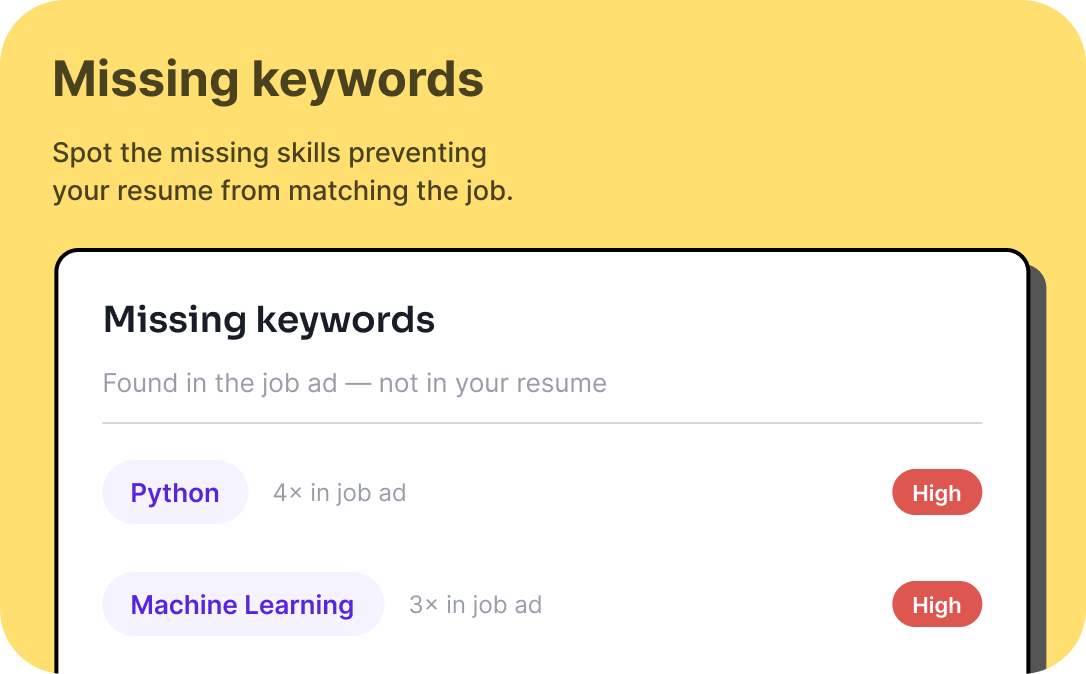
A quality resume checker can help you identify missing keywords related to a specific job description, detect formatting issues that may affect ATS readability, review section organization and completeness and point out weak or vague wording. We recommend using the ResumeLime ATS checker before every job application.
Remember, no tool can guarantee interviews or job offers. Hiring decisions depend on many factors, including experience, qualifications, and competition. However, reviewing your resume before applying can help ensure you're presenting your experience as clearly and effectively as possible.
Make resume reviews part of every Aplication
Instead of sending the same resume to dozens of employers, take a few minutes to review it for each opportunity:
1. Read the job description carefully.
2. Tailor your resume to emphasize relevant experience.
3. Check formatting for ATS compatibility.
4. Review keyword alignment naturally.
5. Proofread for grammar and consistency.
6. Submit with confidence.
Even small improvements can make your resume more relevant and easier for recruiters to evaluate.
Best practices for every job application
An ATS-friendly resume is only one part of a successful job search. To improve your chances of getting interviews, follow these habits consistently.
Tailor every resume
Avoid sending the exact same resume to every employer. Customize your professional summary, skills, and achievements to reflect each position's priorities. Small adjustments often make a meaningful difference.
Be honest about your experience
Never include certifications, skills, or responsibilities you don't actually possess. Recruiters verify qualifications throughout the hiring process, and honesty builds long-term credibility.
Proofread before youapply
Simple mistakes can distract recruiters. Before submitting: check spelling and grammar, verify employment dates, test hyperlinks, confirm contact information, and save the correct file version. A polished resume demonstrates attention to detail.
Follow application instructions
If an employer requests a specific file format, a cover letter, portfolio samples, or salary expectations, provide exactly what's requested. Following directions reflects professionalism and ensures your application isn't overlooked for preventable reasons.
Frequently asked questions about applicant tracking systems
Do all companies use an Applicant Tracking System?
No. While most medium-sized and large organizations use an ATS to manage applications, many small businesses still review resumes manually. However, because ATS software is so widely adopted, it's a good idea to create a resume that is compatible with both automated systems and human recruiters.
Can an ATS automatically reject my resume?
An ATS can filter or organize applications based on criteria set by recruiters, but it doesn't make hiring decisions on its own. Recruiters determine which candidates move forward based on qualifications, experience, and overall fit for the role.
Is a PDF or word document better for ATS?
Most modern ATS platforms can accurately read both PDF and DOCX files. The safest approach is to follow the employer's application instructions. If no preference is listed, either format is generally acceptable, provided your resume uses a clean, readable layout.
Can an ATS read graphics, icons, and tables?
Some systems can process simple design elements, but complex graphics, multi-column layouts, text boxes, and images may cause parsing issues. If important information is embedded in these elements, recruiters may not see it correctly. A simple, professional design is usually the safest choice.
Should I customize my resume for every job?
Yes. Tailoring your resume to match each job description helps highlight the most relevant experience, skills, and accomplishments. You don't need to rewrite your resume from scratch, but making targeted updates can significantly improve its relevance.
How can I tell if my resume is ATS-friendly?
The easiest way is to review your resume against the job description and test it with a reliable resume analysis tool. This can help identify formatting issues, missing skills, weak wording, and opportunities to improve alignment with the position.
Key takeaways
Understanding how an Applicant Tracking System works allows you to approach the job application process with greater confidence. Rather than trying to "beat" ATS software, focus on creating a resume that clearly communicates your qualifications. Recruiters use ATS platforms to organize applications and search for candidates—not to replace human judgment.
Before submitting your next application, remember these best practices:
• Use a clean, professional resume format.
• Include relevant skills that genuinely reflect your experience.
• Tailor your resume for each position.
• Quantify your achievements whenever possible.
• Follow the employer's application instructions.
• Review your resume for ATS compatibility before applying.
Taking a few extra minutes to optimize your resume can make it easier for recruiters to find, understand, and evaluate your qualifications.